Sensor Battery Life and Replacement
Homeowner Summary
Most Shipshape sensors are battery-powered and run for roughly two to five years before the battery needs replacing, depending on the device and how often it reports. Shipshape watches battery level for you and sends a low-battery alert well before a sensor goes dark, so a dead battery rarely catches you by surprise.
Swapping one takes about two minutes and needs no tools. This article covers which battery your sensor takes, how to open the case and seat the new cell, how to wake the sensor so it reports in right away, and how to confirm in the app that it is back online.
Which Battery Your Sensor Takes
| Sensor | Battery | Typical life | How the case opens |
|---|---|---|---|
| Water leak sensor | CR2, 3V lithium. A few early units take ER14250, see below | 1 to 2 years | Lift the cover up and off the base |
| MultiSensor 7 | CR123A, 3V lithium | ~2 years | Twist the back cover counterclockwise |
| TriSensor 8 | CR123A, 3V lithium | 2 to 3 years | Pop it off the magnetic mount, then slide or twist the back cover |
| Door and window sensor, Basic (ZWA008) | CR123A, 3V lithium | ~2 years | Slide the cover off |
| Door and window sensor, Pro (ZWA012) | CR123A, 3V lithium | ~2 years | Remove the back plate |
| aërQ temperature and humidity sensor | CR2477, 3V lithium | Multi-year | Press the two indented arrows on the sides and pull the halves apart |
| Gateway, range extender, smart plug, siren, energy meter | None, these are mains powered | — | — |
The rule that beats the table: read the code printed on the cell you take out and buy that exact code. If you have already removed it, photograph the printed side before you throw it away. That photo answers the question forever, and support can read it for you.
Water leak sensor: buy a CR2, 3V
Nearly every Shipshape leak sensor takes a CR2, 3V lithium battery.
A small number of early sensors take an ER14250, 3.6V instead, and a CR2 will not fit those. If you are not certain which one you have, check the battery: take the old one out and read the code printed on its side.
| Old battery says | Buy |
|---|---|
| CR2 or CR14250 (3V) | CR2, 3V |
| ER14250 (3.6V) | ER14250, 3.6V |
Do not put a 3.6V battery in a 3V sensor, or the other way around. In Aeotec's words, the wrong battery will prevent the device from powering on.
Cannot read the old battery? Look at the sticker underneath where it sat. A code ending in -A02, -B02 or -C02 takes a CR2. One ending in -A, -B or -C is the older sensor and takes an ER14250. Still not sure? Send us a photo through the app and we will tell you which one to buy.
A CR123A does not fit a leak sensor. It is the larger cell used in the motion, temperature, and door/window sensors, so it is an easy one to grab by mistake if you keep spares for other Shipshape devices.
Opening the Case and Putting the Battery In
The pictures below are the Water Sensor 7 Pro, the same illustrations the Shipshape app shows during setup. Other sensors twist or pinch open instead of sliding, so check the How the case opens column in the table above for yours. Everything else on this page is the same for every sensor.
-
Take the sensor down. Leak sensors sit on the floor near water-using appliances. Motion and temperature sensors are on a wall, ceiling, or shelf, and the TriSensor 8 lifts straight off its magnetic base.
-
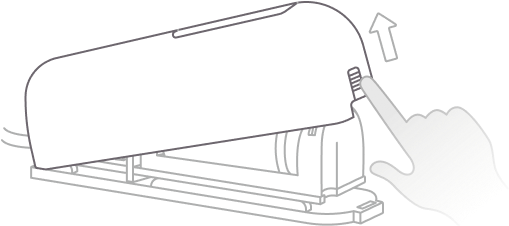
Open the cover. Lift it away from the base.
-
Take the old cell out. The battery sits lengthwise in the bay along the base. Note which way it faces before you pull it, and read the code printed on the side. That code is what you buy.

On a brand new sensor there is a plastic pull tab in this same spot instead, sitting between the cell and the contact to stop it draining in the box. Pull it out and the sensor powers up. There is no tab on a battery you are replacing.
-
Put the new cell in. Match the + end, the one with the small raised nub, to the + stamped in the compartment. A backwards cell will not damage the sensor, but the sensor will stay dark.
-
Close the cover until it clicks or seats firmly. A cover that is not fully seated can let the cell lose contact later.
-
Put the sensor back exactly where it was. On a leak sensor, the metal probes must face down, touching the floor or the surface you want monitored.
Where you have the choice, do the swap with the sensor near the gateway so it re-establishes a strong connection right away. Recycle the old cell at a battery drop-off rather than putting it in the trash.
⚠️ Leave the tamper switch alone
The small switch on the base, next to the probe connector, is the tamper switch. It is the control the app has you press during setup.

Three quick presses puts the sensor into pairing mode, which is not what you want during a battery swap. A sensor that drops out of your network has to be paired again before it can report anything. If you press it by accident and the LED starts blinking, close the cover, leave it alone for a minute, and check the app. If the sensor has gone offline, contact support rather than pressing it again.
Wake the Sensor Up so It Reports In
A battery sensor spends almost all of its life asleep. That is what makes the battery last years, but it also means a sensor with a fresh cell can sit quiet for a long time before it checks in on its own. A door and window sensor, for example, only checks for waiting commands every 12 hours by default.
So do not stand there watching the app. Trigger the sensor and it reports immediately.
| Sensor | How to wake it |
|---|---|
| Water leak sensor | Wet a fingertip and touch both metal prongs at the same time. The LED lights within a second, and the alert reaches your phone in about ten seconds. Wipe the prongs dry and the alert clears on its own. |
| MultiSensor 7 and TriSensor 8 | Wave your hand in front of it. Motion detection stays active even in sleep mode, so any movement wakes the sensor immediately. |
| Door and window sensor | Open the door or window and close it again. |
| aërQ temperature and humidity sensor | One short press of the button. That forces an immediate reading, updates the mold-risk indicator, and sends a wake-up report to the gateway. |
Heads up on the leak sensor test: the wet-finger test fires a real water alert, so anyone else on the home will get the notification too. Let them know first if that matters, and dry the probes when you are done.
Confirm It's Back Online in the App
-
Give it a minute or two. The sensor runs through its startup and looks for the gateway on its own.
-
Open the Shipshape app and find the device. Its detail screen is where battery level and connection status live.
-
Check for two things: the device reads Online, and the battery level has refreshed.
-
If the battery level still looks low, the app is showing the last value the sensor sent, not the new cell. Wake the sensor using the table above and the reading updates on the next report.
-
If every device reads offline, not just this one, the problem is your gateway, not the battery. Start with Gateway Is Showing Offline. One sensor offline while the others are fine points at that sensor.
If It Doesn't Come Back Online
Work down this list in order.
- Reseat the cell. Contacts do not always make a clean connection the first time. Take it out, wait 10 seconds, put it back in.
- Check the orientation against the + stamped in the compartment.
- Try a cell from a sealed package. One that has been in a drawer for years may already be partly depleted.
- Confirm the gateway is online in the app. A sensor cannot report in through a gateway that is down.
- Test the range. Move the sensor near the gateway temporarily. If it connects there, it needs a range extender near its permanent spot.
- Contact support. Shipshape can check the sensor's status remotely and arrange a replacement if the hardware has failed.
For leak sensors specifically, Water Leak Sensor Offline or Low Battery goes deeper.
Why a Battery Drains Faster Than Expected
1. Frequent triggering or sensor activity
- A sensor that is triggered repeatedly, for example a leak sensor placed where it keeps getting wet or a door sensor on a heavily used door, stays active longer and uses more power.
- On water-leak detectors, the small internal sensor button being pressed or held for an extended period keeps the sensor engaged and accelerates drain.
2. Weak connection or signal strength
- If a sensor struggles to hold a steady connection, because it is far from the gateway or there is interference, it burns extra power retrying.
- Moving it closer, or adding a range extender, improves both connection and battery life.
3. Battery installation or quality
- Make sure the cell is seated correctly, with the + side matching the + symbol in the compartment.
- Battery quality varies between manufacturers. Use a reputable name-brand cell of the exact type specified for your device. These are single-use lithium cells and are not rechargeable.
4. Natural wear and environment
- Battery lifespan varies with temperature and humidity. A sensor in a hot attic, an unconditioned crawl space, or a cold detached garage will see shorter battery life than one in conditioned living space.
When to Call a Professional
A fresh, correctly installed cell that drains again within weeks usually points to a hardware fault or a placement problem rather than the battery itself. Contact Shipshape support or your installer if a device repeatedly drains new cells, or if it will not come back online after a replacement and a range check.
Shipshape Integration
Shipshape monitors battery level on every battery-powered sensor and raises a low-battery alert before the sensor stops reporting, typically with about two weeks of life left. You replace batteries on your schedule, not after a sensor has already gone silent. Repeated low-battery alerts on the same device, especially soon after a replacement, are a signal worth investigating with support.